
My applications
-
Where do I find My applications?
You can find My applications by logging in to My page (external website).
-
Which applications can I find on My applications?
My applications contains submitted applications and electronic application drafts registered to the user you logged in with.
Application drafts that have not been changed or submitted within six weeks will be deleted.
Not all application types are displayed on My applications.
Among others, first time applications for protection (asylum), applications for assisted return and repatriation, and applications that were submitted on paper are not displayed on My applications. -
I can not find my application. How do I find it?
If you can not find your application on My applications, it might be due to one of the following reasons:
1. You used a different login method
Applications are only displayed on My applications when you log in using the same login method as you did when you first created the application.
UDI offers two different login methods:- ID-porten
- Email address and password
If you cannot find your application, try logging in with the other login method.
2. Not all application types are displayed on My applications
Among others, first time applications for protection (asylum), applications for assisted return and repatriation, and applications that were submitted on paper are not displayed on My applications.
3. The application was submitted before April 2022
Some applications submitted before April 2022 require that you contact UDI directly to request access.
-
Can I check the status of my application?
Applications for Norwegian citizenship
Most people who have applied for Norwegian citizenship can view the status of their application on My page. Log in with ID-porten and click "Follow my application" in the top menu on My page.
You have to log in with ID-porten to find "Follow my application".
If you used your email address and password to log in, you can not access "Follow my application".If you do not see "Follow my application" on My page, you can find more information on our page about waiting time for citizenship applications.
Other applications
If you have applied for something other than Norwegian citizenship, you can not follow your application status on My page yet.
Find more information about application waiting times on our page about waiting times.
Documents
-
How do I send documents for one of my applications?
On My applications, you can send additional documents to your submitted applications.
- Find your application under "Submitted applications"
- Click on the "Submit additional documents" buttion next to the application.
This will take you to the page where you can upload and add documents to your application.
-
How do I send documents to an application that is not on My applications?
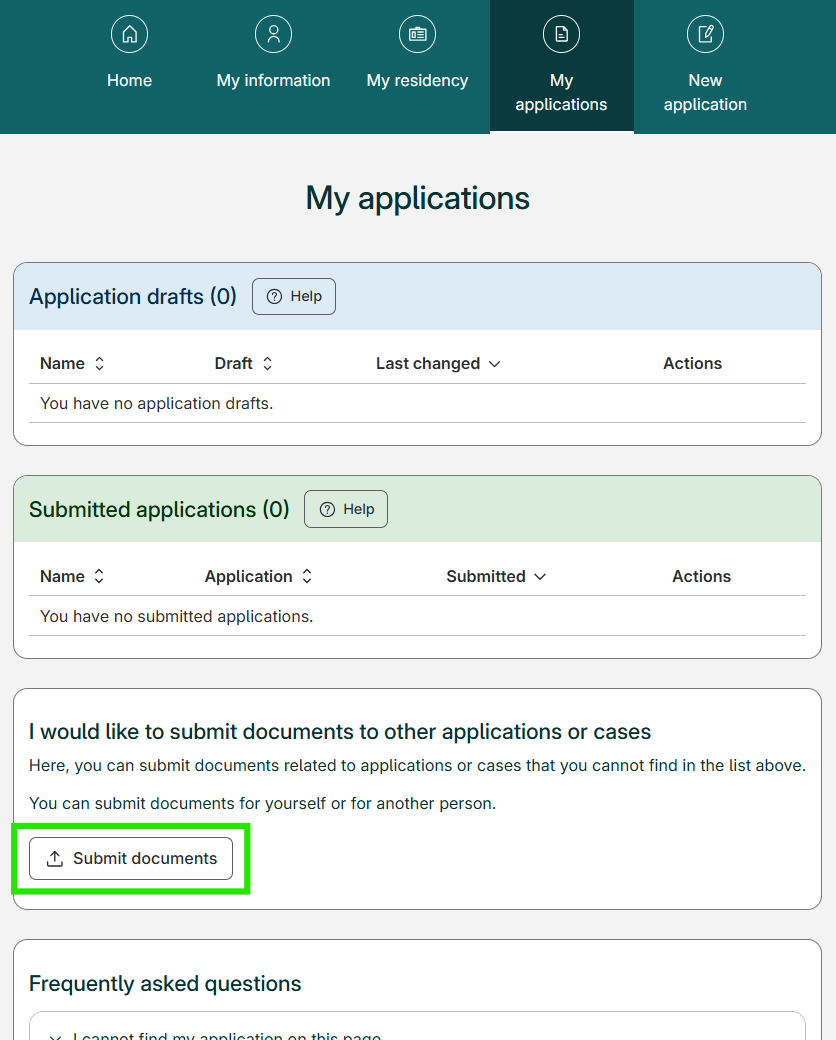
If you want to submit documents to an application or case not displayed in your My applications list, you can use the "Submit documents" button. This will take you to the page where you can submit documents without connecting them to a specific application.
You will find the "Submit documents" button on My applications, under your applications and the heading "I would like to submit documents to other applications or cases", and above "Frequently asked questions".
-
Which documents do I need to bring with me to my appointment?
To see which documents you have to bring with you to your appointment, you can log in on My page and go to My applications.
Find your application under "Submitted applications" and click "Go to application".
Click the "Download a document overview" button on your receipt. This lets you download the pdf file that shows you which documents you have to bring to your appointment.
Booking an appointment
-
How do I book an appointment for attendance?
Find your application under "Submitted applications" on My applications and click on the "Go to application" button. From there you can book an appointment with the police by clicking on "Book an appointment".
-
How do I book an appointment for an application that is not on My applications?
To book an appointment for an application that is not on My applications, you must contact the police directly. You will find the contact information for the police here (external website).
Application fee
-
Where can I pay the application fee?
If you have to pay an application fee for your application, the fee must be paid in order for your application to be completed and submitted.
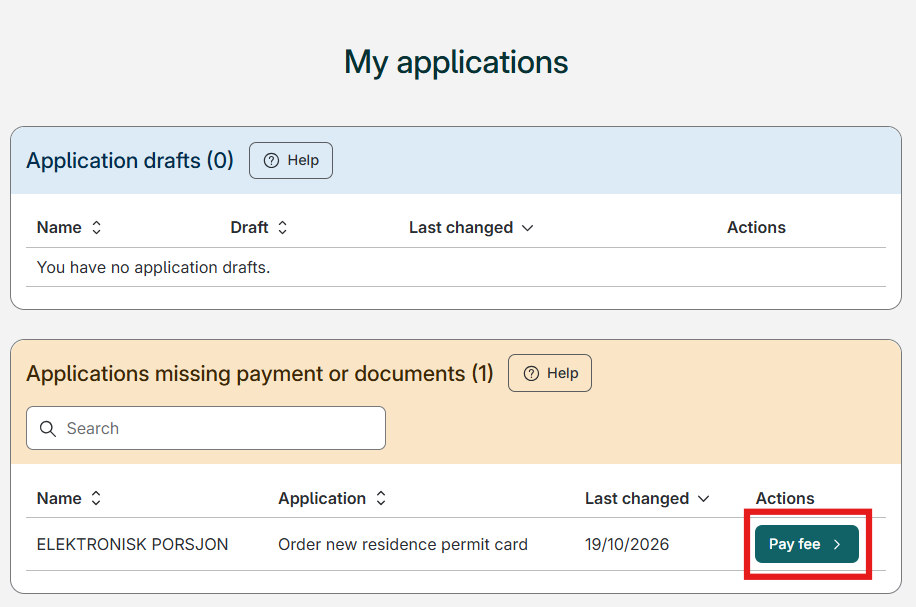
If you need to pay the application fee, you can log in on My page and go to My applications. The application missing payment will be placed in the yellow section titled "Applications missing payment or documents". Click the "Pay fee"-button next to your application to go directly to the payment page.
Example
-
Where do I find the reference number after I have paid?
If you are unsure where to find your reference number, you can find more information on our page about reference numbers.